Creating a website

In terms of web hosting... be very careful picking a host based on their ranking on "Top 10 Web Host" sites--a lot of those are paid placement / scams. You can find much more reliable and enlightening web host reviews by searching sites like webhostingtalk.com . I moved my site to a new host about six months ago and did a fair amount of research... I ended up going with Hawkhost and have been quite happy with them thus far; HostGator was also on my short list. I've not previously heard of Inmotion--so they might be fine--but I'd suggest digging a bit deeper before you use them for anything that's very mission-critical.

HostGator is who I use and I can think of only a few times in the past 5+ years that they've been down for more than a minute or two. Each of those times they had it back up and running quickly...

They have great customer service, chat 24/7 with a real person and typically only takes a minute or two to reach someone. Plus, they offer some pretty cheap shared hosting.
 
Nice site. Simple like it should be, and good graphics and use of font in the graphics. Not a big fan of vertical scrolling though, but at least you don't have TONS of it.

Thanks. My personal portfolio site was my learning platform for Wordpress. Found a theme that had very little built-in customization and hacked my way through the code till I understood how it worked. It's not perfect, so when I get to developing version 2 I'll fix stuff like the project images navigation being on the bottom and not the top.
 
As for hosting, I've used Bluehost and 1 And 1. I've been satisfied with both. Have really only noticed downtime once or twice and it was in the middle of the night when I was working on my site. Very reasonably priced.
 
What's the best/easiest way to work with a website? Just deciding if I want to learn HTML, CSS, Javascript, etc. When I was using Wordpress, using one of those was optional, but I decided it would be useful to learn more. Thanks

I know very little about Wordpress, but knowing HTML and CSS is dead useful, especially when the Dreamweaver tools aren't cooperating with me.

Amazon.com: HTML, XHTML, and CSS, Sixth Edition (9780321430847): Elizabeth Castro: Books

I used an older version of this book back when I took a web development class at ISU. Taught me everything I needed to know in HTML and CSS and I still reference it to this day.
 
What's the best/easiest way to work with a website? Just deciding if I want to learn HTML, CSS, Javascript, etc. When I was using Wordpress, using one of those was optional, but I decided it would be useful to learn more. Thanks

The good thing about HTML/CSS/Javascript is you can make pages locally and test locally. I.e. go into Notepad, make a page (type in your HTML, CSS, etc), save as an HTML file, and then open up the page in your web browser. If you don't have any server-side requests going on that you made yourself (i.e. J2EE, PHP, etc) you'll be fine. I doubt you'll have any of that.

So, there's tons of free resources out there and there's tons of books. It's really up to you. IMO you should learn your basic HTML before anything because really, CSS is all about HTML styles, and Javascript you will be modifying HTML elements. When you get to Javascript, I would recommend learning JQuery. It will allow you to do cool effects on your site without much coding work.

Trial and error and free resources for this one. There's tons out there..
 
The good thing about HTML/CSS/Javascript is you can make pages locally and test locally. I.e. go into Notepad, make a page (type in your HTML, CSS, etc), save as an HTML file, and then open up the page in your web browser. If you don't have any server-side requests going on that you made yourself (i.e. J2EE, PHP, etc) you'll be fine. I doubt you'll have any of that.

So, there's tons of free resources out there and there's tons of books. It's really up to you. IMO you should learn your basic HTML before anything because really, CSS is all about HTML styles, and Javascript you will be modifying HTML elements. When you get to Javascript, I would recommend learning JQuery. It will allow you to do cool effects on your site without much coding work.

Trial and error and free resources for this one. There's tons out there..

Thanks for the help. I guess I'll try learning HTML until I get that down, and then move on to CSS.
 
Another quick question while I'm at it- how do you save a notepad document as an html file? Is that in the naming of it? My only option appears to be to save it as a .txt file, and the quick sample that I did shows up with my html language in it.

Pretty sure you just click "Save as," change the "Save as type" to "All Files" and name your file and put the file extension at the end.
 
Another quick question while I'm at it- how do you save a notepad document as an html file? Is that in the naming of it? My only option appears to be to save it as a .txt file, and the quick sample that I did shows up with my html language in it.

Save it as (name of file).html and hit enter and you're all good - it won't default to .txt.
 
Another quick question while I'm at it- how do you save a notepad document as an html file? Is that in the naming of it? My only option appears to be to save it as a .txt file, and the quick sample that I did shows up with my html language in it.

Go to File -> Save As, then choose All file Types, and type in say whatever.html


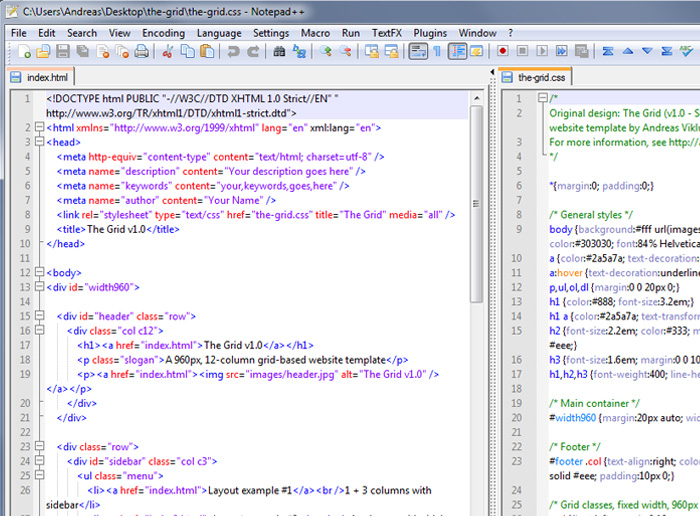
However, Notepad sucks and there are alternatives out there. I recommend either Notepad++ (Notepad++ v5.9.8 - Current Version) or Textpad (TextPad Downloads). Maybe Notepad++ because it has syntax coloring.. i.e.:

notepad-plusplus-screenshot.jpg
 
Last edited:

Help Support Us

Become a patron